
manipulating webcam data
December 15, 2022

ian jojo
It turns out that it's relatively easy to manipulate a user's webcam data with math!
javascript
Today's coding experiment is all about manipulating a user's webcam.
First, we get the user's webcam (with their permission) with navigator.mediaDevices.getUserMedia.
function getVideo() { navigator.mediaDevices .getUserMedia({ video: true, audio: false }) .then((localMediaStream) => { video.srcObject = localMediaStream; video.play(); }).catch((err) => { console.error("Oh no!", err); }); }Once we've got this, we can then draw the current image from the webcam to a new HTML canvas with drawImage. I'm then creating an array of all the pixels in that current frame. It's a massive array of numbers and it's organized by R, G, B, Alpha. So starting from 0, every 4th pixel is a red one, and starting from 1, every 4th pixel is a green one, etc.
This makes it surprisingly easy to write some loops that skip through the array four pixels at a time, and change their values. Finally, we re-paint our modified pixels with putImageData. I'm running all this in a setInterval, running every 16ms, to continually "paint" these modified pixels back to the canvas, giving us our effected webcam video.
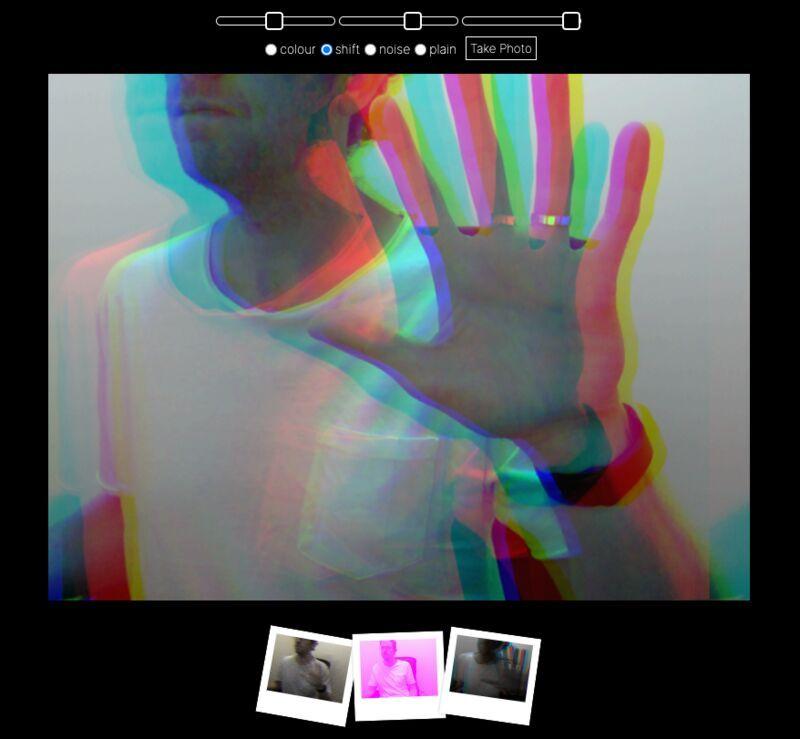
The three range sliders up top provide pretty random results. In colour mode, they control the R, G, and B values respectively, but in the other modes, they pretty much have a life of their own. There's also four radio buttons which provide different "modes". They each just have a bit of different math to them, shifting pixels by various amounts, most of which are also controlled by the three sliders.
It's all a bit loose and unhinged at the moment but it's very exciting to me how easy it is to manipulate this data. You can take a photo with the Take Photo button and a thumbnail will be displayed below. Clicking a thumbnail allows you to download it locally for all eternity. It's working smoothest right now on desktop - I don't recommend trying it on your phone.
Try it out for yourself here: https://lnkd.in/g8-ut6sZ and feel free to post any particularly delightful results in the comments. Thanks for your time and I hope you're having a very good day.
The tutorial which taught me these concepts is from Wes Bos' Javascript30 series, which I highly recommend.